Lab Exercise 10 (FLAMES)
Overview
For this exercise, you are to create an Elm MVU single-page app of the FLAMES childrens' game.
This activity is intended to be done with the randomized partner assigned to you during your lab class.
This lab has checkpoint tasks; these tasks must be done during your lab session to get some bonus points.
FLAMES
FLAMES is a paper-and-pencil game popular among school-aged children. In the game, you provide the names of two people, and it supposedly predicts the future relationship of the two people.
FLAMES is an acronym for the possible outcomes of the game. In order, they are:
F: Friends
L: Lovers
A: Affectionate
M: Married
E: Enemies
S: Siblings
The gameplay of FLAMES (or FLAME) has the following steps:
- Write the names of the two people on a sheet of paper.
- Only alphabetical characters will be considered, so you can ignore/cross out non-alphabetical characters.
- Cross out any common letter (case-insensitive) that appears in both the names. If the common letter(s) appears uneven times in the two names,
- [crossout rule] all of its occurrences in both names may be crossed, or
- [count rule] just as many occurrences that are common in the two may be crossed.
- Count the total number of remaining letters in the two names. Let this number be \(n\).
- Write "FLAMES" on the sheet of paper.
- Start counting the letters of "FLAMES" one-by-one, until you reach \(n\), starting your count at 1. If \(n\) is greater than 6, wrap-around and continue counting through "FLAMES". Repeat as many times as necessary until you reach \(n\).
- The ending letter gives you the future relationship between between the two people. If \(n = 0\), the ending letter is S, for Siblings.
Crossout rule
For the crossout rule, all letters common to both names will be crossed out, regardless of the number of each common letter.
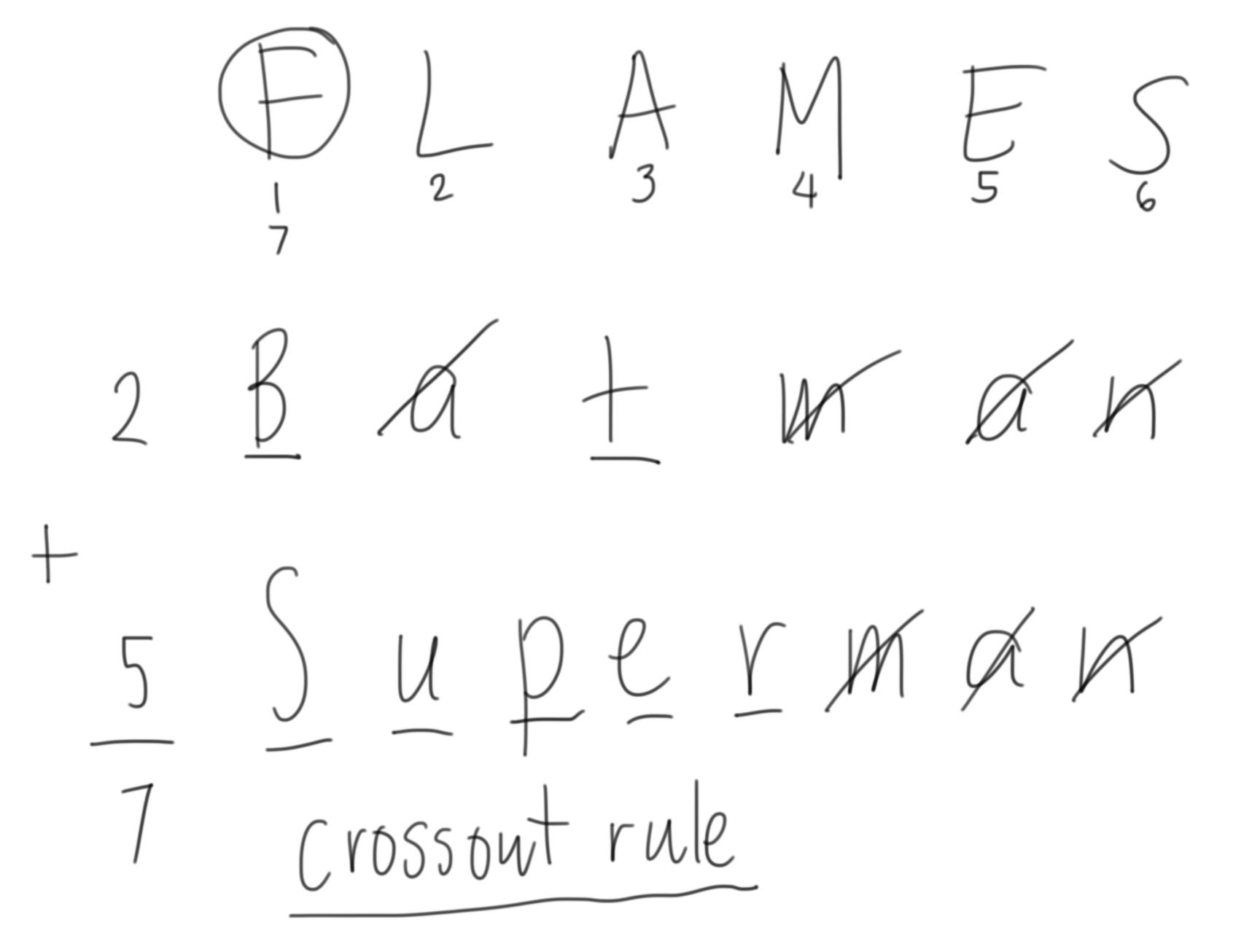
In the example above, "Batman" and "Superman" are Friends.
Count rule
For the count rule, only as many common letters between the two names are removed, respecting the number of copies of each letter.
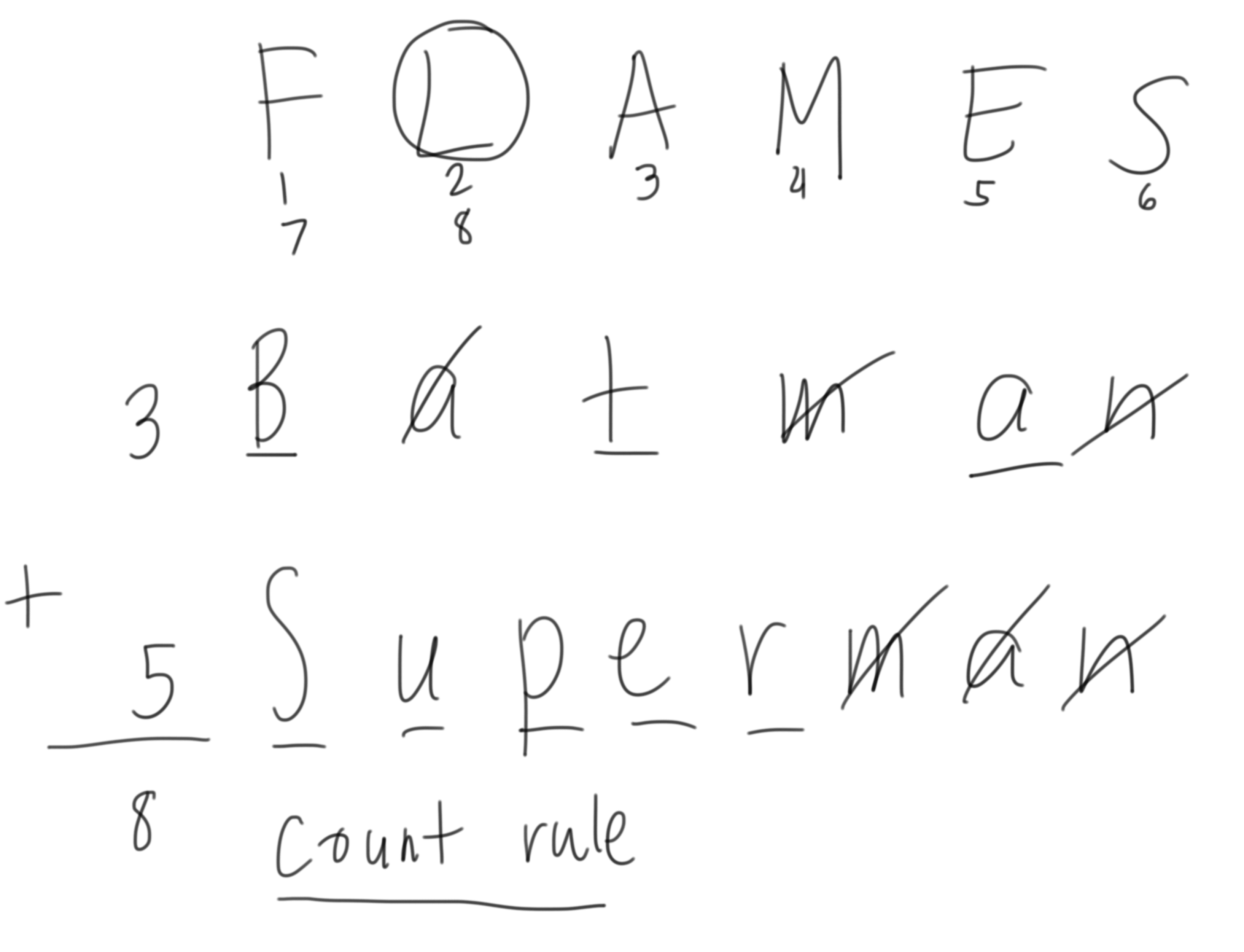
In the example above, "Batman" and "Superman" are Lovers.
MVU App
For the Elm app, the basic implementation will be composed of a paragraph to display the result, along with two textboxes where the names will be entered. Initially, the two textboxes are empty.
If at least one of the textboxes are empty, the display will show Please enter two names.

If both textboxes are nonempty, the display will show the "FLAMES" result according to the crossout rule. Follow the format of the display indicated in the screenshot.

The display should show the correct result in real-time as the content of the textboxes are being edited. Follow the format of the display indicated in the screenshot.
An extended feature for the app is the option to switch between the two modes, crossout and count. For this added feature, a dropdown box will be available to choose the mode.


For additional bonus features, please refer to the Submission section below.
Scoring
Your app will be scored on the highest-scoring stage that you will be able to correctly implement.
Checkpoint: Just concatenate (Lab10Checkpoint.elm) (20 ❤️)
Before the lab session ends, you should be able to implement a working Elm MVU app, showing the following basic layout,
except, only display the concatenation of the two names, if both textboxes are not empty. Otherwise, show the error message Please enter two names.
Call the attention of your lab instructor once you are done with the checkpoint task. Once your "Just concatenate" MVU app has been verified to work five (5) minutes before the lab session ends, you will gain 20 ❤️ points, and your attendance will be recorded (and you may leave early).
If you are not able to finish the checkpoint task within the lab time, your attendance will be recorded at the very end of the lab session.
Checkpoint submission: See Google Classroom
Stage 1: Crossout mode only (Lab10Stage1.elm) (80 🔴)
Implement the MVU app using the crossout mode. You don't need to implement the dropdown select box for this stage.
Stage 2: Mode switcher (Lab10Stage2.elm) (90 🔴)
Implement the MVU app with the dropdown select box to choose between the crossout mode and the count mode.
Stage 3: Add more names (Lab10Stage3.elm) (100 🔴)
From Stage 2, add a button with text Add name, that adds additional textboxes to the app. The display will still show the standard error message if at least one textbox is empty.
For this Stage, the display will now show the "FLAMES" result of each consecutive pairs names in the series of names, one line (paragraph) per result.
Stage 4: Pairwise FLAMES (Lab10Stage4.elm) (120 🔴)
From Stage 3, add a button alongside each extra textbox such that when clicked, will delete the textbox, along with the button. The app should always contain at least two textboxes (the original two at the beginning). The display will still show the standard error message if at least one textbox is empty.
In addition, the display will now show the pairwise "FLAMES" results for each pair of names in the textboxes. Display the results as described by the following pseudocode:
display = []
for i in range(len(list_of_textboxes)):
    textbox1 = list_of_textboxes[i]
    for j in range(i + 1, len(list_of_textboxes)):
        textbox2 = list_of_textboxes[j]
        display.append(flames(textbox1.value, textbox2.value))

show display
Submission
- GitHub Classroom: https://classroom.github.com/a/DgAuSthm
- Deadline: April 30 (Th), 11:12 PM