Lab Exercise 6 (Whac-A-Mole: Pyxel View)
Context
Whac-A-Mole is a Japanese arcade game that was created in 1975 by the amusements manufacturer TOGO in Japan. A typical Whac-A-Mole arcade machine has a play area and display screen, and a large mallet. Five to eight holes in the play area are occupied by plastic, cartoonish moles (or other characters), which pop up at random. Points are scored by whacking each mole as they appear. The faster the reaction, the higher the score.
For this lab exercise, you are to implement a View for an existing Model for Whac-A-Mole, using the pyxel Python library. The game will now be a "real-time" version (not turn-based).
Overview
You will be structuring your code using the Model-View-Controller design pattern, and applying some Object-Oriented Programming principles you learned so far.
The Model and the Controller will be provided in the git repo; your job is to create the View using Pyxel, as well as extend the Model for some bonus tasks.
For succeeding phases of the lab exercise, more mole types will be available via subtyping, and custom behavior for the game's randomization and end game condition will be injected.
Gameplay and Template
The base game will be running until the specified win condition is met. Moles are arranged roughly in a circle, indexed 0 to n - 1. The game will support six, seven, or eight moles.
Moles will pop up randomly, just like the arcade game version.
Each mole will stay active for a certain amount of time and then hide. If a mole gets hit and loses all its hit points, it will be forced to hide in the same turn. The player will gain points upon forcing a mole to hide.
Model and Mole classes
The game will be developed using the following implementation specifications:
For the base game, an implementation of the SimpleMole class is provided, which will follow the Mole interface, implemented as an abstract base class (ABC). The Mole ABC inherits from the MoleInfo abstract base class.
The MoleInfo abstract base class supports the following interface:
-
@property@abstractmethoddef base_hit_points(self) -> int: ...- Returns anintdenoting the default hit points of a mole when created or when it pops up -
@property@abstractmethoddef base_active_ticks(self) -> int: ...- Returns anintdenoting the default number of ticks/frames a mole staysACTIVEbefore hiding. -
@property@abstractmethoddef base_cooldown_ticks(self) -> int: ...- Returns anintdenoting the default number of ticks/frames a mole staysINACTIVEbefore being able to pop out again. -
@property@abstractmethoddef hit_points(self) -> int: ...- Returns anintdenoting the current hit points of the mole -
@property@abstractmethoddef cooldown_ticks(self) -> int: ...- Returns anintdenoting the current number of ticks/frames a mole staysINACTIVEbefore being able to pop out again. -
@property@abstractmethoddef points(self) -> int: ...- Returns anint, which is the amount of points the player gains if thisMole's hit points is reduced to zero (or less). -
@property@abstractmethoddef is_active(self) -> bool: ...- ReturnsTrueif a mole isACTIVE -
@property@abstractmethoddef is_dead(self) -> bool: ...- ReturnsTrueif a mole isHITand its hit points are less than or equal to zero -
@property@abstractmethoddef state(self) -> MoleState: ...- Returns aMoleStatevalue, which is anEnumthat describes the state of theMolewith the following values: -ACTIVE-INACTIVE-HIT
The Mole class inherits from MoleInfo, and has the following additional attributes and methods:
-
@abstractmethoddef pop_up(self) -> None(method) - Sets the state of the mole toACTIVE, and does any additional behavior. -
@abstractmethoddef hide(self) -> None(method) - Sets the state of the mole toINACTIVE, and does any additional behavior. -
@abstractmethoddef receive_hit(self, damage: int) -> None(method) - Sets the state of the mole toHIT, and does any additional behavior. -
@abstractmethoddef start_tick(self) -> None(method) - Signals the start of the tick for the mole and updates the mole state accordingly. -
@abstractmethoddef end_tick(self) -> None(method) - Signals the end of the tick/frame for the mole and updates the mole state accordingly. -
@abstractmethoddef affect_moles(self, moles: Sequence[Mole]) (method)- Interact with otherMoles.
All Mole implementations must follow this interface. You are free to specify the __init__() (initializer) method of Mole classes.
The given Model class has the following attributes and methods:
-
def __init__(self, moles: Sequence[Mole], rng: Random, hammer_damage: int, mole_popup_plan: MolePopupPlan, win_condition: GameOverCondition)- Takes in
moleswhich is aSequenceofMoleinstances to be used by the game. Adding or removing elements from themoleslist should not affect the state of the model. - Takes in an
rngRandominstance, to be used for all random number generation. - Takes in an
inthammer_damage, which is the damage thatMoles take when hit, in this game. - Takes in a
MolePopupPlaninstance, which is used to configure how the moles pop up each turn (see details below) - Takes in a
GameOverConditioninstance, which specifies when the game ends (see details below)
- Takes in
-
@propertydef is_game_over(self) -> bool- Returns abooldenoting if the game is over. -
@propertydef moles_info(self) -> Sequence[MoleInfo]- Returns aSequence[MoleInfo]containing theMoleInfos for the game instance. -
@propertydef score total_points(self) -> int- Returns anint, denoting the current number of points the player has accumulated. -
def update(self, click_idx: None | int) -> None- Updates the game state by one tick
The MolePopupPlan Protocol supports the following methods:
-
def __init__(self, ...)- You are free to specify all its parameters
-
def choose_moles_to_popup(self, current_tick: int, moles: Sequence[MoleInfo], rng: Random) -> list[int]- Returns a
list[int]indicating the indices of moles to pop up.
- Returns a
The GameOverCondition Protocol supports the following methods:
-
def __init__(self, ...)- You are free to specify all its parameters
-
def is_game_over(self, moles: Sequence[MoleInfo], current_tick: int, points: int) -> bool- Determines if the game is over based on the mole information and game state.
Controller
A sample Controller implementation is provided with the template for this lab exercise.
Task
Main task: View
Your task is to write a View class using Pyxel for the Whac-a-mole game. The class must be able to support 6, 7, or 8 moles. The image below is a screenshot of a six-mole layout.
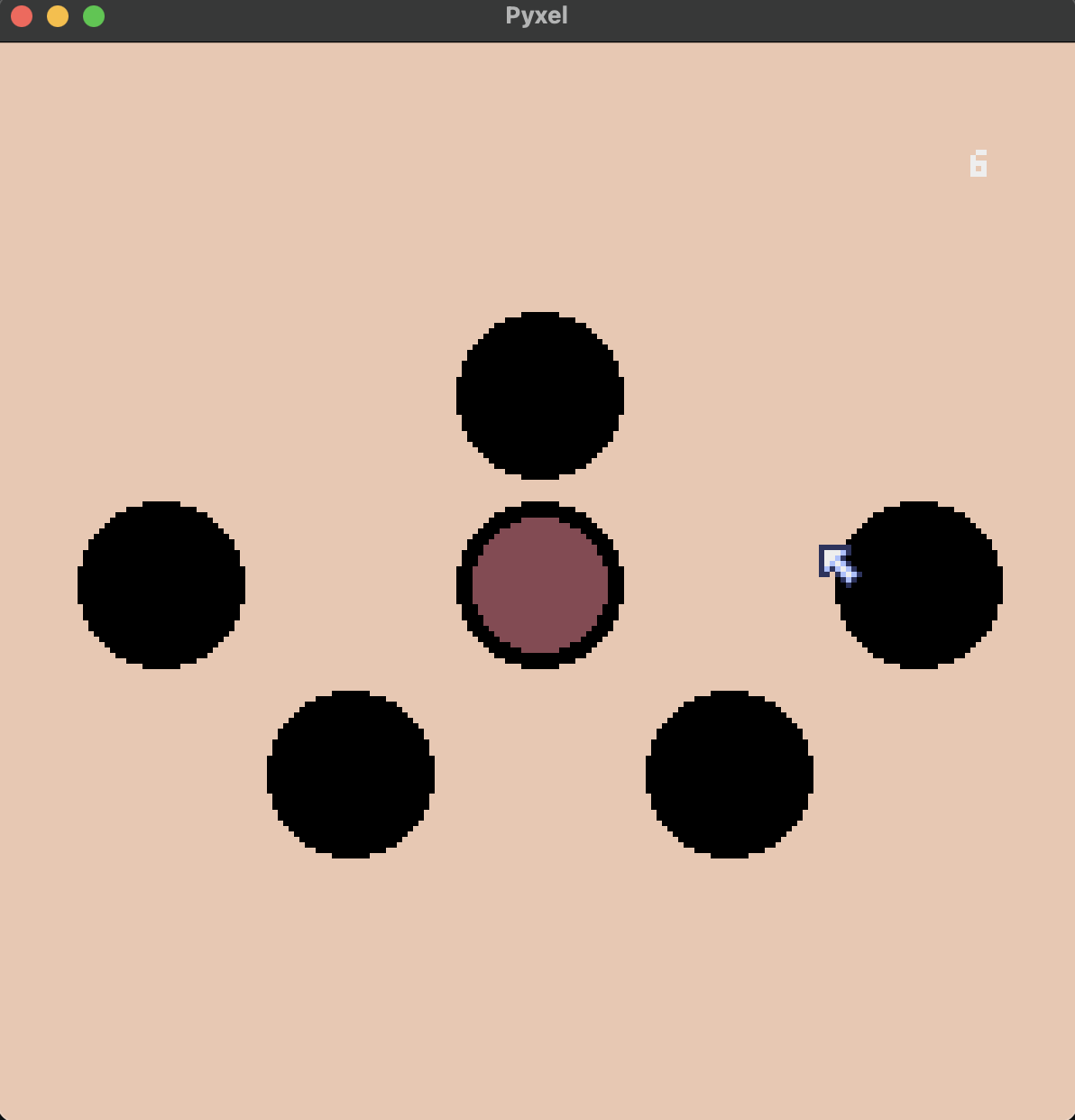
The seven-mole layout would be presented like the diagram below:
   1
2     6
   0
3     5
   4
And the eight-mole layout would be presented like the diagram below:
    1

2       7
    0
3       6

  4   5
Mouse left clicks should correspond to hammer whacks. A mole should hide once it gets hit and loses all of its hit points.
The current score should be displayed in the upper right corner of the screen.
The game should stop updating once the win condition is met.
The View class should have the following methods:
-
def __init__(self, width, height)- Takes two arguments for the width and height of the Pyxel screen.
-
def start_game(self, update_handler: UpdateHandler, draw_handler: DrawHandler) -> None- Entry point for the Pyxel runtime; this method will call at least
pyxel.init(...)andpyxel.run(...)
- Entry point for the Pyxel runtime; this method will call at least
-
def get_clicked_mole(self) -> int | None- Checks to see if any of the active moles have been clicked, and returns the corresponding index for the mole (based on the layouts). If no active moles were clicked, returns
None.
- Checks to see if any of the active moles have been clicked, and returns the corresponding index for the mole (based on the layouts). If no active moles were clicked, returns
-
def draw_moles(self, moles_info: Sequence[MoleInfo]) -> None:- Draws the moles on the Pyxel screen
-
def draw_moles(self, score: int) -> None:- Draws the score on the Pyxel screen
-
def reset_screen(self) -> None:- Resets the screen to one color
The UpdateHandler Protocol supports the following methods:
def update(self)- A method/function accepting no parameters, used for the Pyxel runtime
The DrawHandler Protocol supports the following methods:
def draw(self)- A method/function accepting no parameters, used for the Pyxel runtime
Scoring
This lab exercise will be scored in phases. You can get \(0/20/50/80/100 \%\) of the points in a phase depending on how far/close you are from meeting the phase's requirements. You must get \(\ge 80 \%\) of the points in each of the previous phases to get nonzero points for a certain phase.
This lab will be scored over \(100\) 🔴.
Note
For all phases, your program should be runnable using the command pyxel run main.py.
Indicate the farthest phase you (think you) got in a README.md file.
Phase 1 (\(60\) 🔴)
For this phase, you will implement the base functionalities for the Pyxel view, and can only edit view.py.
The view must support 6-8 moles, following the layouts detailed above.
In terms of graphics, we expect you to implement simple shapes only (built-in shapes in Pyxel).
There will be only one type of Mole for this phase, which is the SimpleMole.
A SimpleMole has the following features:
-
base_hit_pointsis 1 -
pointsis 1 -
No additional behavior.
At the start of the game, before the first turn, all the Moles are INACTIVE.
The base game will use a SimpleMolePopupPlan, where every 30 ticks/frames,
if there are x inactive moles, a random amount of moles from \(0\) to max(0, 2 // 3 * x) (inclusive) will pop up,
The base game will also use a SimpleGameOverCondition, where the game will end after you get a score of 20.
Phase 2 (\(40\) 🔴)
For Phase 2, you may modify moles.py and model.py (as well as controller.py).
With Phase 1 features still working, the game must support these additional types of Moles:
BombMole
-
base_hit_pointsis \(1\) -
pointsis \(-5\)
LuckyMole
-
base_hit_pointsis \(1\) -
pointsis \(2\) -
When targeted to be hit, has a \(50\%\) chance to dodge the incoming hit.
RichMole
-
base_hit_pointsis \(2\) -
pointsis \(1\) -
Every time the mole goes into hiding without getting hit, its point value increases by 1.
ScaredyMole
-
base_hit_pointsis \(1\) -
base_active_turnsis \(2\) -
pointsis \(1\) -
If a mole is forced into hiding after getting hit, any moles adjacent to it become
INACTIVEand hide. - The adjacency of holes for
ScaredyMoleis defined as follows, for the three different layouts:
   1
2     5
   0
 3   4

0 adjacent to 1, 2, 3, 4, 5
1 adjacent to 0, 2, 5
2 adjacent to 0, 1, 3
3 adjacent to 0, 2, 4
4 adjacent to 0, 3, 5
5 adjacent to 0, 1, 4
   1
2     6
   0
3     5
   4

0 adjacent to 1, 2, 3, 4, 5, 6
1 adjacent to 0, 2, 6
2 adjacent to 0, 1, 3
3 adjacent to 0, 2, 4
4 adjacent to 0, 3, 5
5 adjacent to 0, 4, 6
6 adjacent to 0, 1, 5
    1

2       7
    0
3       6

  4   5

0 adjacent to 1, 2, 3, 4, 5, 6, 7
1 adjacent to 0, 2, 7
2 adjacent to 0, 1, 3
3 adjacent to 0, 2, 4
4 adjacent to 0, 3, 5
5 adjacent to 0, 4, 6
6 adjacent to 0, 5, 7
7 adjacent to 0, 1, 6
It is up to you to set the colors or indicators for the different mole types. Spawn a maximum of three (3) moles for each mole type.
Sprites bonus (\(20\) ❤️)
For the Sprites bonus, you can create your own sprites for each mole to replace the basic shapes. See https://kitao.github.io/pyxel/web/editor-manual/ for more details, and feel free to consult other resources.
Sound effects bonus (\(20\) ❤️)
For the Sound effects bonus, you can create your own sound effects or game music to play for the game. Add at least two sound effects, (1) for when you click and hit a mole, and (2) for when you click and don't hit a mole. See https://kitao.github.io/pyxel/web/editor-manual/ for more details, and feel free to consult other resources.
Submission
Via GitHub Classroom (by pair submission).
Your submission must have the following files:
controller.py
model.py
moles.py
view.py
main.py
README.md
Put all your Mole classes, MolePopupPlan classes, GameOverCondition classes, in moles.py. For the later phases, you can modify model.py. See the template repository in GitHub Classroom.
Unit test files should also be in the same directory. \(100\%\) code coverage is expected for the model.py file.
GitHub Classroom link: https://classroom.github.com/a/uYc0sd42
Deadline: April 23 (Th), 11:33 PM