Lab Exercise 7 (Poképedia)
Overview
For this Lab Exercise, you will be making a web-based Pokémon info displayer using HTML and PyScript.
You will be working with the PokéAPI, which provides data about Pokémon.
For this lab exercise, you will be using the following URL to interact with PokéAPI:
https://pokeapi.co/api/v2/
Ensure that you use this URL for all parts of the exercise.
Warning
For this lab exercise, we will be treating the URL above as the root. Subsequent references to the API will no longer include the root, just the relevant endpoint (e.g., /pokemon/pikachu refers to https://pokeapi.co/api/v2/pokemon/pikachu).
Info
You are expected to import (and use) the following:
pyscriptpyscript.fetchasyncio
You will not be allowed to modify index.html.
Scoring
This lab exercise will be scored in phases. You can get \(0/20/50/80/100 \%\) of the points in a phase depending on how far/close you are from meeting the phase's requirements. You must get \(\ge 80 \%\) of the points in each of the previous phases to get nonzero points for a certain phase.
This lab will be scored over \(100\) 🔴. Note that the points indicated beside each section are cumulative.
Note
For all phases, running python3 -m http.server then opening localhost:8000 should show a page exhibiting the expected behavior (assuming port 8000 is not already in use).
Indicate the farthest phase you (think you) got in a README.md file.
One Pokémon (30 🔴 + 5 ❤️)
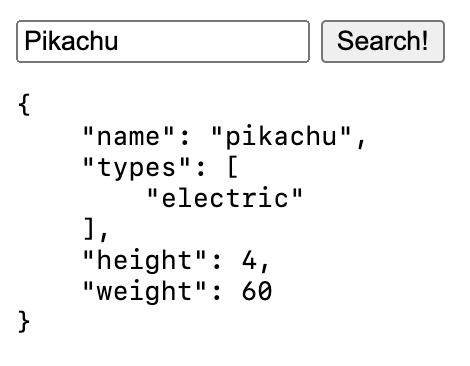
For this phase, you will be querying PokéAPI using a text input and a button.
A user should input the name of the Pokémon they want to get the information of using the text input. When the button is clicked, the user should then be able to see the following information about the Pokémon they queried:
- name (
str), - type(s) (
list[str]), - height (
int), and - weight (
int).
This information must be shown as a Python dictionary in a code block, using the pre tag.
Note that you should be case-insensitive to whatever the user inputs; that is, the user should see the same thing when they type Pikachu and pikachu.
Info
Making a query to /pokemon/{name} returns an object with the following structure:
{
    "name": ...,
    "types": [
        {
            "type": {
                "name": ...,
            },
        },
        ...
    ],
    "height": ...,
    "weight": ...,
}
Note that this isn't the entire structure of the returned object; only the relevant parts are shown here.
Info
You can pretty-print a Python dictionary by using json.dumps:
import json

json.dumps(object, indent=4)
Here, indent indicates the indentation level (in spaces) of the pretty-printed dictionary.
- A text input element and a button element exist.
- The relevant Pokémon information is shown when the button is pressed.
- The text input is case-insensitive.
One Pokémon++ (50 🔴 + 10 ❤️)
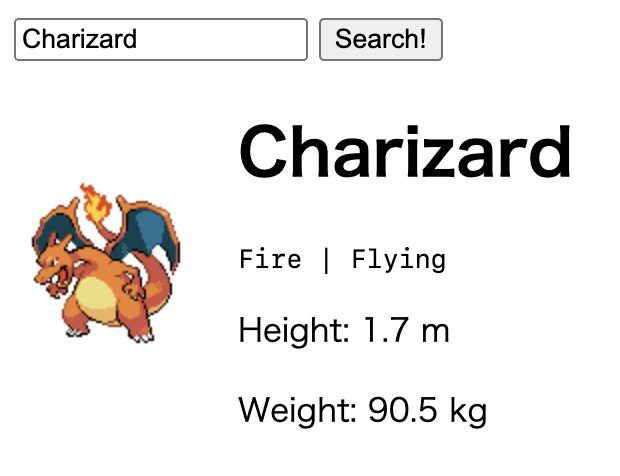
Let's present the Pokémon's information better! You must use the following tags to show information about the Pokémon:
- an
<img>tag for the Pokémon's sprite (use any of the image links you obtain from PokéAPI), - an
<h1>tag for the Pokémon's name, <code>tag(s) for the Pokémon's type(s), separated by the|character, and<p>tags for the Pokémon's height (in meters) and weight (in kilograms).
Ensure that it is easy to distinguish different parts of the information.
Info
Note that PokéAPI returns 10 times the actual height (in meters) and 10 times the actual weight (in kilograms) of a Pokémon, in order to be able to return them as integers.
Info
The object obtained by making a query to /pokemon/{name} also has the following field(s):
{
    "sprites": {
        "front_default": ...,
    },
}
Note that you may use any of the links found in the object corresponding to the sprites key; front_default corresponds to just one possible link you may use.
- The right HTML tags exist, and they show the correct information.
Many Pokémon (80 🔴 + 15 ❤️)
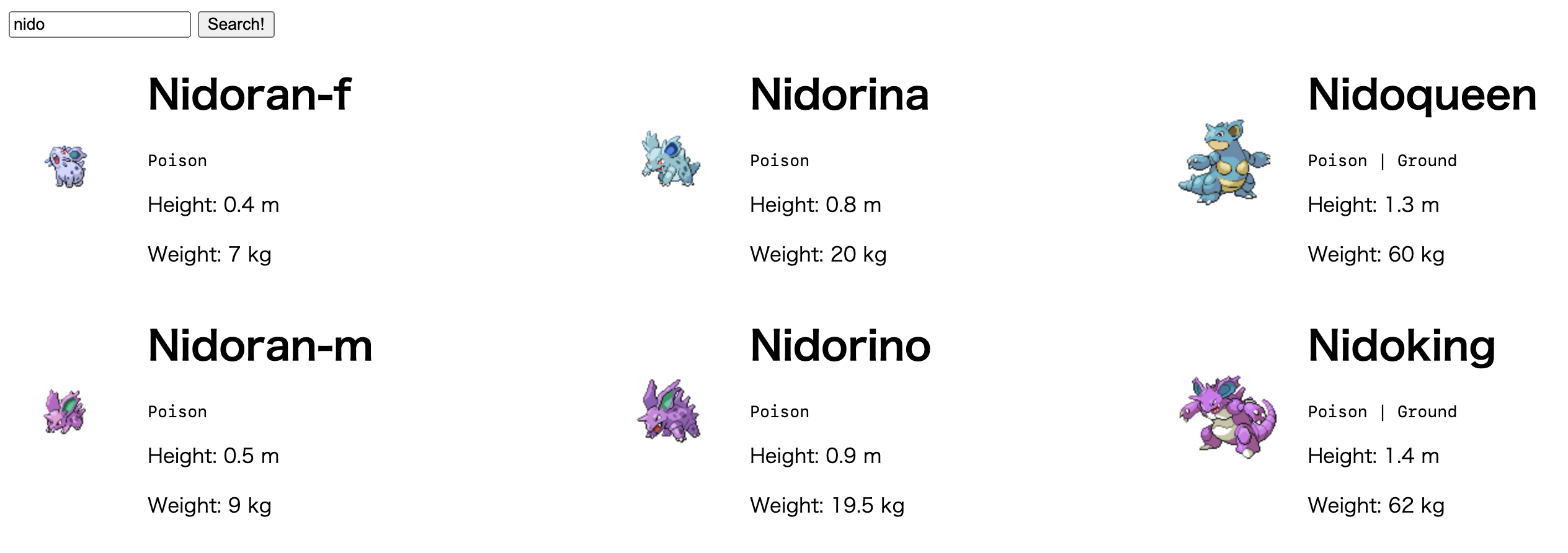
Let w be the text in the input field. In Phases 1 and 2, you only considered the Pokémon whose name is w; in this phase, you'll consider all Generation 1 Pokémon whose name starts with w!
When the submit button is pressed, show the same information by using the same HTML tags for each Generation 1 Pokémon whose name starts with the input. Note that all names start with the empty string.
If you will be showing multiple Pokémon, show them in increasing order of Pokédex number.
You must get the information of all relevant Pokémon concurrently.
Info
Making a query to /generation/{generation_number} returns an object with the following structure:
{
    "pokemon_species": [
        {
            "name": ...,
        },
        ...
    ],
}
Again, note that this isn't the entire structure of the returned object; only the relevant parts are shown here.
Info
The object obtained by making a query to /pokemon/{name} also has the following field(s):
{
    "id": ...,
}
Here, id refers to the Pokédex number of the Pokémon.
Info
The styles display: grid; and grid-template-columns: auto auto ... auto; make an element have \(c\) columns, where \(c\) is the number of autos. For this phase, you are advised to set \(c\) to 3 or 4 for best (visual) results.
- The search does not need to contain a full Pokémon name to work.
- All information for all relevant Pokémon is displayed properly.
- All relevant Pokémon are displayed concurrently.
- The Pokémon are displayed in increasing Pokédex number.
Many Pokémon++ (100 🔴 + 20 ❤️)
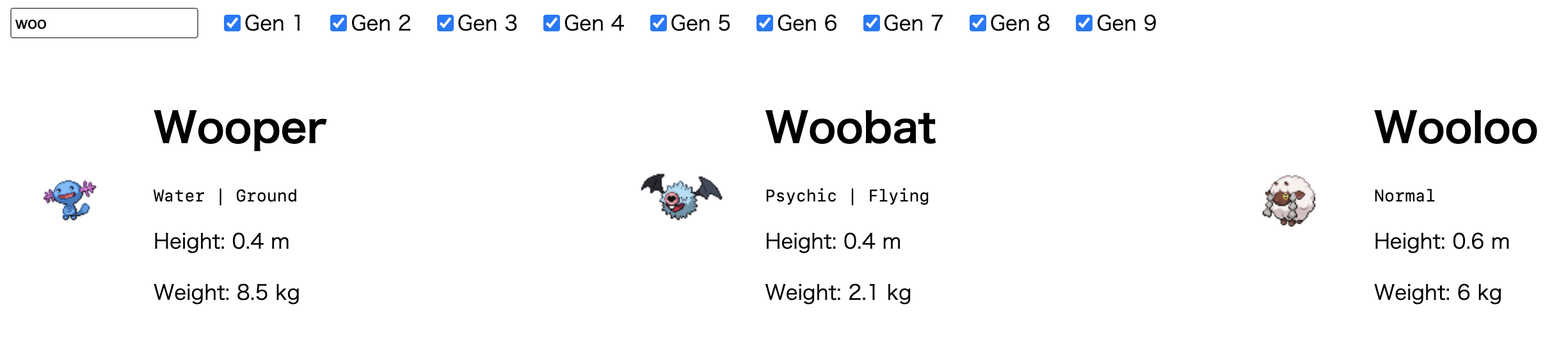
There are 9 Pokémon generations (to date), not just one!
For the final phase, allow the user to decide which subset of generations to choose from when finding all Pokémon whose names start with the input.
There should be a checkbox input element for each generation, which is ticked iff the user wants to choose from that generation. By default, only the checkbox for Generation 1 should be ticked by default.
In addition, the Pokémon shown should be updated every time the value in the input field changes or one of the checkboxes is toggled, not when the Submit button is pressed. To that end, you no longer need to include the Submit button.
Pokémon that are shown must still be sorted in increasing Pokédex number.
Info
For the purposes of this phase, the oninput key handler should give the most visually intuitive results (rather than onchange or onkeypress).
Info
Instead of querying to /pokemon/{name}, it is recommended to query /pokemon/{id} instead, as using the raw name of a Pokémon does not necessarily work (e.g., /pokemon/meloetta returns Not Found).
In line with this, you may find it helpful that the object obtained by making a query to /generation/{generation_number} also has the url field:
{
    "pokemon_species": [
        {
            "name": ...,
            "url": ...,
        },
        ...
    ],
}
The value of url is of the form /pokemon-species/{id}; as such, you may extract the id here.
Info
Now that you are working with Pokémon across multiple generations, you may come across Pokémon with weird names returned by PokéAPI, like Deoxys being shown as Deoxys-normal.
You may leave these edge cases as is.
- The search results are updated every time an input element's value changes.
- Only the Gen 1 checkbox is ticked by default.
- All information for all relevant Pokémon is displayed properly.
- The Pokémon are still displayed in increasing Pokédex number.
Submission
Via GitHub Classroom (by pair submission).
Your submission must have the following files:
index.html
main.py
README.md
GitHub Classroom link: https://classroom.github.com/a/40WbYZ59
Deadline: April 23 (Th), 11:32 PM