HOPE 2 (Grub Food)
Useful links/cheatsheets:
-
TO GET STARTED, follow the steps in
instructions.txtin your Desktop folder. Credentials are increds.txt. - Elm Cheatsheet (extract
.zipand open the HTML file) - Ellie app Elm editor
- Zeal has Elm docset, search (
Ctrl + F) forelm/coreorelm/htmlfor the docs for the built-in libraries - Zeal also has HTML cheatsheets installed
elmvia the Terminal is also available (elm reactorto run local server)
Overview
For HOPE 2, you are to create an Elm MVU implementation of the food order interface from one of the more popular ride-hailing/food delivery apps, Grub Food.
This HOPE has Checkpoint Tasks; if your implementation has fully-working features for a given checkpoint, you will get the points for that checkpoint.
Solo Order
For the Solo Order implementation, the app will simulate ordering food online from a single store/restaurant, with a certain set of unique items, each with a unit price. There will be one user/customer to place an order consisting of 0 or more counts of each item.
Menu
The menu will consist of a fixed set of Items, or parsed from a CSV-formatted string, where each line describes an Item (see the Checkpoint Tasks for more details). The menu is guaranteed to have at least one (1) Item.
Items
Each Item must be uniquely identified using an integer id, which is up to you to determine. In addition, Items have a nonempty elm String name, and a nonnegative elm Float price, which is the price of one unit of the item.
Group Order
For the Group Order implementation, the app will simulate you as the Host of a group order, where there could be as many as 6 members participating in the order, including the host.
Members
The app can add up to five additional (5) members (6 members maximum, including the Host) in the group order, with each member having their own set of items for their suborder, and could display the corresponding subtotals.
In the app, the user should be able to choose the active member from a dropdown select box. Initially, the active member is the Host (Member 1). The active member chosen in the select box will receive the item orders when the item buttons are clicked.
There should be a button to add additional members to the Group Order. One click on this button will add one additional member, unless there are already six members (including the Host), in which case clicking the button does nothing.
Discounts
Discounts will be applied depending on the number of members in the group order. The following discounts will apply to the total bill (and subtotals, if applicable):
\(3\) members: \(5\%\) discount
\(4\) members: \(8\%\) discount
\(5\) members: \(11\%\) discount
\(6\) members: \(15\%\) discount
The subtotals for each member of the group order should reflect the discounted price for the suborder (see Payment options below for more details).
Payment options
There are two possible payment options: (1) the Host pays, or (2) the bill is split among the members.
Host pays
For this option, the Host pays for the full bill. This means that the subtotals for the other members should be 0.00.
Split bill with members
For this option, each member pays for their own order. The subtotal for each member of the group order should be displayed.
MVU App
Menu data
If available, menu data should be saved as a global variable named data, ready for parsing.
Here is a sample CSV-formatted data string:
data = """Burger,5
Fries,2
Spaghetti,4"""
This corresponds to
Burger,5
Fries,2
Spaghetti,4
Item
You are required to write a type alias for an Item, as an Elm record. The Item record should have the following three fields:
id : Int: Unique integer id for the food itemname : String: Human-readable name for the food itemprice : Float: Nonnegative float value for the price of one unit of the food item
You may add more fields if you wish.
Model
You are required to write a type alias for the model, which is an Elm record.
The model is required to have the following two fields: items and orders. You may add more fields as needed.
Additional type aliases/types
You are free to define additional type aliases or types in order to more accurately represent the data for the app.
View
Layout
-
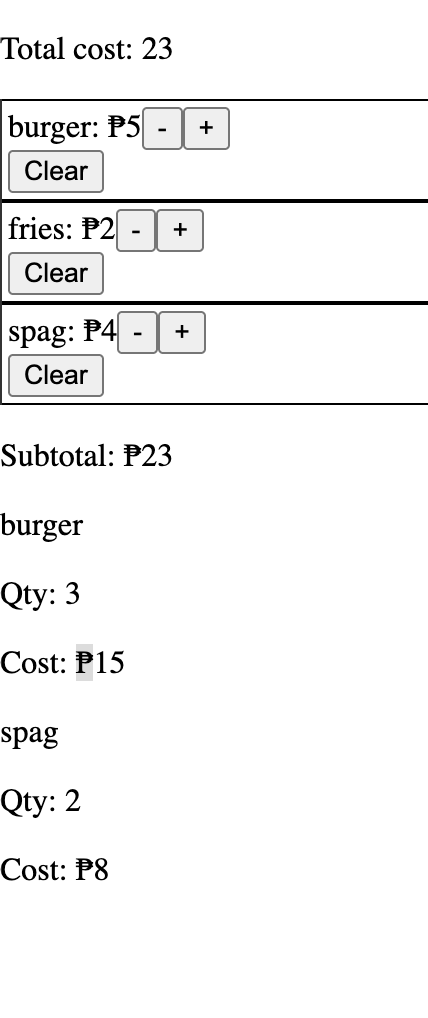
The app starts with the total cost of the order at the top of the page, contained in a
div. -
Below the order cost are the menu
Items, each one contained in its owndiv. EachItemdivdisplays the name of the item, the unit cost, and three buttons:-+Clear
+increments the quantity of the item by 1, while-decrements the quantity by 1, with minimum quantity \(0\). Pressing the-button further when quantity is \(0\) should have no effect. TheClearbutton resets the quantity for that item to \(0\). -
Below the
Items will be adivthat will contain the order information. Thisdivcontains the following in order:- a paragraph (HTML
p) containing text for the subtotal cost. For Solo Order, this subtotal is equal to the total cost. - several
divs (could be zero), each detailing the item name, quantity, and total cost (quantity times price) of eachItemincluded in the order.
Only
Items with nonzero quantities should be displayed in the order. - a paragraph (HTML
The info can be structured as follows:
<div id="orders">

    <div id="order1">
        <p>Host/Member 1</p>
        <p>Subtotal: ₱23</p>

        <div id="order1item1">
            <p>Burger</p>
            <p>Qty: 3</p>
            <p>Cost: ₱15</p>
        </div>

        <div id="order1item2">
            <p>Spaghetti</p>
            <p>Qty: 2</p>
            <p>Cost: ₱8</p>
        </div>
    </div>

</div>
Group Order specifics
For Group Order, the structure of the web app is as follows, in order:
-
A
divcontaining the total cost of the order at the top of the page, the same as item 1 of Solo Order. -
A
divs (one or more) containing menuItems, showing the same elements as item 2 of Solo Order. -
A
divcontaining a dropdown box (HTMLselect) to choose the active member. Initially, this dropdown box only contains the optionHost/Member 1. Additional members will have namesMember 2,Member 3, ..., untilMember 6.3.1. This
divalso contains abuttonwith the textAdd member. When this button is clicked, one additional member is added to the group order. -
Below the
Items will be adivthat will contain the order information. Thisdivcontains the following:-
Several
divs (at least one, for the Host) for each member.-
Each member
divstarts with a paragraph (HTMLp) containing text for the subtotal cost. For Solo Order, this subtotal is equal to the total cost. -
After the subtotal, there are several (could be zero) inner
divs detailing the item name, quantity, and total cost (quantity times price) of eachItemincluded in the order for that member.
-
-
Some details of the View class may change per Checkpoint. Please see the Checkpoints section below for more details.
Submission
All variables and functions must be type-annotated. Submissions with compile errors will not be checked.
Checkpoints
You will be graded according to the highest-scoring checkpoint that you are able to implement correctly.
Checkpoint 0: Solo Order: Fixed one-item menu (20 ❤️)
For this checkpoint, there is only one item in the menu, which is
"Tapsilog", priced at170.00
The app should be able to handle one person ordering.
Checkpoint 1: Solo Order: Fixed three-item menu (40 ❤️)
For this checkpoint, there are exactly three items in the menu, which are
"Tapsilog", priced at170.00"Bunch of Lunch Hawaiian 1, priced at269.00"Sinigang na Beef Short Rib & Watermelon, priced at315.00
The app should be able to handle one person ordering.
Checkpoint 2: Solo Order: Parse menu from CSV string (20 ❤️ + 60 🔴)
You can go straight to Checkpoint 2 without finishing Checkpoint 0 or Checkpoint 1.
For this checkpoint, the number of menu items will vary depending on the provided CSV-formatted String. At least one menu item will be in the data.
The app should be able to handle one person ordering.
Checkpoint 3: Group Order: no discounts, bill split among members (20 ❤️ + 80 🔴)
For this checkpoint, the number of menu items will vary depending on the provided CSV-formatted String. At least one menu item will be in the data.
The app should be able to handle group orders; the user must be able to add up to five (5) additional members to the order. Subtotals must be shown for each member.
Discounts are not applied for this checkpoint. The bill will be split among all the members.
Checkpoint 4: Group Order: with discounts, two payment options (20 ❤️ + 100 🔴)
For this checkpoint, the number of menu items will vary depending on the provided CSV-formatted String. At least one menu item will be in the data.
The app should be able to handle group orders; the user must be able to add up to five (5) additional members to the order. Subtotals must be shown for each member.
Discounts should apply depending on the number of members in the group order.
\(3\) members: \(5\%\) discount
\(4\) members: \(8\%\) discount
\(5\) members: \(11\%\) discount
\(6\) members: \(15\%\) discount
There should be a dropdown box to allow the host to choose the payment option. By default, the payment option is Split bill among members, where the subtotals should be displayed per member.
The other option is the Host pays, where the total bill should appear at the host's subtotal, and the subtotals of the other members (if there are any) should be \(0.00\).
Bonuses
Bonus: Search bar to filter Items (for Checkpoint 2 onwards) (20 🔴)
Add a search bar near the top of the web app which acts like an autocomplete filter for the food Items available.
This would be a textbox that detects changes in its text. If the textbox is empty, all menu Items should be displayed.
Bonus: Button to remove a member from the Group Order (for Checkpoint 3 onwards) (20 ❤️)
Add a button that when clicked, will remove the corresponding Items for the current active member, and remove the member from the Group Order. The total and subtotal values should be updated accordingly. Other functionalities of the app should still work properly afterwards.
Bonus: CSS styling (for Checkpoint 2 onwards) (0 - 20 ❤️)
For the CSS styling bonus, add CSS to your app to clean up the user interface and make the layout more visually appealing. You may dothe following improvements but are not limited to them:
- Displaying the menu
Items in a \(2\)-column grid or similar - Adding borders and padding to order items and between member orders (for Group Order)
- Vary text fonts (differentiate numerical text from descriptive text)
- Add colors to distinguish buttons
Grading
HOPE 2 will be scored over 100 🔴 points.
Git submission
See the instructions.txt in your Desktop folder.
- Deadline: end of lab session